
Dongles and Adapters: Types and Applications of Hardware Connectors
In the world of computing and electronics, we often encounter small, specialized pieces of hardware that bridge the gap between two different interfaces. Commonly referred to as dongles or adapters, these devices allow users to expand the functionality of their hardware, protect intellectual property, or maintain compatibility with aging technology.
While the term is often used loosely, a dongle is generally a small piece of hardware that plugs into a port—such as USB or HDMI—to provide additional services or connectivity that the host device does not possess natively.
Key Facts
- Software Protection: Dongles are used as physical keys to prevent unauthorized copying of software.
- Form Factor: Modern dongles have evolved from serial and parallel ports to predominantly USB and HDMI formats.
- Media Streaming: Stick-like devices like Chromecast and Fire TV Stick utilize the dongle form factor for television integration.
- Legacy Support: Specialized adapters allow modern storage, like SD cards, to emulate old floppy or hard disk drives for vintage computers.
- Industry Terminology: Some IT professionals prefer the term Pig-tail for adapters that connect a miniature interface to a full-sized equivalent.
Software Protection and Security
One of the primary historical uses of the dongle is software protection. These devices act as a physical lock; the software will only run if the specific hardware dongle is detected in the port. While early versions utilized serial or parallel ports, the vast majority of modern security dongles use the USB format to prevent unauthorized use and piracy.
Small Peripheral Appliances
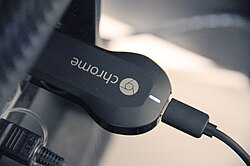
During the mid-to-late 2010s, the dongle design was adapted for digital media players. These devices, such as the Fire TV Stick and Chromecast, feature a compact, stick-like shape designed to plug directly into a television's HDMI port. Unlike traditional set-top boxes, these are powered via an AC adapter or a Micro USB connection from the TV itself.
This miniaturized approach extends to computing as well, with the production of single-board computers like the Intel Compute Stick, which packs a full operating system into a dongle-sized device.
Adapters and Connectivity Solutions
Adapters serve as essential bridges when physical space is limited or when two different standards must communicate. Very short cables are often used to connect large jacks to smaller plugs, ensuring that equipment with tight connector spacing remains accessible.
Audio and Radio Adapters
Connectivity solutions also exist for analog audio. Cassette adapters allow older cassette-radios to accept AUX inputs from smartphones, MP3 players, or portable CD players. Similarly, personal FM transmitters enable portable audio systems to broadcast content to a standard FM radio.
Legacy Hardware Emulation
Dongles play a critical role in preserving vintage computing. Solid-state dongles can emulate IDE/PATA connectivity, allowing SD cards to act as floppy or hard disk drives for legacy systems like the Apple II and Commodore 64.
In the automotive world, emulators allow older cars with external CD changers to recognize USB and SD cards as "tracks," updating the functionality of the original head unit circuitry.
Specialized Interface Converters
Some adapters convert miniature interfaces to full-sized equivalents. This is common for expansion cards like Compact Flash, PCMCIA, and ExpressCard, which are too thin to house a standard connector. In the IT industry, these are sometimes called Pig-tails because the thin wire extending from a full-sized connector resembles the tail of a pig.
Common Dongle and Adapter Use Cases
| Category | Example Device | Primary Purpose |
|---|---|---|
| Media | Chromecast / Fire TV Stick | Streaming content via HDMI |
| Security | USB Protection Key | Preventing software piracy |
| Computing | SD Card Reader / Flash Drive | Data transfer and storage |
| Networking | Mobile Broadband Modem | Internet connectivity |
| Gaming | Rumble Pak (Nintendo DS) | Adding haptic feedback to hardware |
Frequently Asked Questions
What is the difference between a dongle and a pigtail?
While often used interchangeably, a pigtail specifically refers to an adapter that converts a miniature interface to a full-sized connector using a short, thin wire.
How do software protection dongles work?
They act as a physical security key. The software is programmed to check for the presence of the specific hardware dongle in a USB or serial port before allowing the program to execute.
Can dongles be used to modernize old computers?
Yes. Solid-state dongles can emulate legacy IDE/PATA drives, allowing modern SD cards to provide storage and software to vintage machines like the Commodore 64.
How are HDMI sticks powered?
Devices like the Chromecast or Fire TV Stick are typically powered through a Micro USB connection linked to the television or via a dedicated AC power adapter.
What are some examples of USB host connectivity dongles?
Common examples include Bluetooth adapters, GPS receivers, SD card readers, network interface controllers, and mobile broadband modems.